Average Ratings 0 Ratings
Average Ratings 0 Ratings
Similar Products
-
DialedInDialedIn is a cloud-based call center software built for teams that demand reliability, performance, and control at scale. It streamlines operations with intelligent tools that simplify call management, optimize agent workflows, and improve customer experiences. Rather than adding layers of complexity, DialedIn provides a flexible, scalable system that reduces wasted time and helps contact centers operate more efficiently. From inbound and outbound calling to blended environments, DialedIn is engineered to adapt to evolving business needs while maintaining compliance and uptime. • Intelligent Call Routing: Matches each customer with the right agent to improve satisfaction and better balance workloads. • Proven Dial Strategies: Leverages advanced algorithms to enhance contact rates and reduce downtime. • Customizable Tools: Adapts to your specific operational needs, ensuring that the technology works for you, not the other way around. • 100% US-Based Support: Offers comprehensive support, including technical and account management, ensuring maximum utilization of the dialer. • CleanCallerID™: An innovative feature that monitors and swaps out DIDs tagged as SPAM/SCAM by carriers with fresh DIDs automatically, ensuring uninterrupted customer interaction. With built-in analytics, reporting, and automation features, supervisors gain full visibility into agent performance and call outcomes, allowing for smarter decision-making and stronger ROI. DialedIn is not only designed to maximize live connections but also to keep agents connected with customers through secure, dependable, and user-friendly technology. By removing friction from daily operations, DialedIn empowers contact centers of all sizes to focus less on manual processes and more on delivering excellence.
-
CallTrackingMetricsCallTrackingMetrics is the only SaaS platform that uses call tracking and conversion intelligence to inform contact center automation--resulting in a more personalized customer experience. Find out which marketing campaigns are generating leads or conversions and use that data for automated call flows and to power your contact centre. Our phone, text, online, and live chat tools allow you to unify communications across your organization. CallTrackingMetrics is trusted by more than 100,000 users worldwide to manage communications for their sales, marketing, and service teams. Call tracking features include reliable dynamic numbers insertion (DNI), for session-level attribution, local and toll-free tracking numbers, and omnichannelattribution across calls, texts and form fills. Contact center features include a browser-based softphone and smart routing options.
-
QEvalContact center QA teams evaluate 1 to 5% of calls manually. QEval eliminates that bottleneck by applying AI speech analytics and automated scoring to 100% of interactions across voice, chat, and email, using a classification engine trained on 138M+ real conversations. Capabilities span quality monitoring, compliance detection for PCI, HIPAA, and GDPR at 98% accuracy, sentiment analysis, keyword identification, agent coaching workflows, performance gamification, and predictive analytics across 110+ configurable dashboards. Quality scoring runs at 94% accuracy with zero manual intervention. Deployment takes 30 days. Industry standard is 90 to 120. No disruption to live operations. Etech Global Services built QEval from two decades of running Fortune 500 contact centers in healthcare, telecom, retail, banking, and BPO. ISO 27001, SOC 2, PCI-DSS certified. Built for QA leaders and operations teams scaling coverage without adding headcount. QEval also provides call recording management, screen capture, custom evaluation forms, calibration tools for QA consistency, root cause analysis, trend identification, and automated alert systems for compliance breaches. The voice of customer module tracks customer sentiment across touchpoints to identify service gaps and training opportunities. Real-time monitoring lets supervisors intervene during live interactions. Role-based access controls, audit trails, and data encryption ensure enterprise-grade security. QEval supports multi-site and multilingual contact center environments with centralized reporting across locations. API integrations connect QEval with existing CRM, telephony, and workforce management systems. Automated report scheduling delivers insights to stakeholders without manual effort.
-
Yeastar P-Series PBX SystemFocusing on delivering "Easy-first Unified Communications", Yeastar P-Series Phone System offers companies of all sizes with a complete package for calls, video, messaging, and integrations, out of the box. Available in the Appliance, Software, and Cloud Editions, P-Series provides flexible deployment options, allowing you to have it sited on-premises or in the cloud. Balancing costs and future growth, it requires a lower total cost of ownership, less training, and fewer management efforts. The ease of use and future-proof adaptability are paramount.
-
CallToolsTransform your contact center operations with CallTools—an innovative cloud-based platform that unifies inbound and outbound dialing for maximum efficiency. Enhance agent productivity and foster stronger customer relationships with robust features like predictive dialing, call recording, and integrated multi-channel campaigns for email and SMS. Gain a holistic understanding of team performance through comprehensive analytics and real-time reporting tools. With flexible integrations, streamlined queue management, and customizable IVR options, CallTools simplifies workflows and delivers superior call outcomes. Optimize your connection rates using advanced data targeting and dynamic caller ID tools. Designed with an intuitive interface, CallTools empowers teams to handle even complex tasks with ease.
-
Thinfinity WorkspaceThinfinity Workspace 7.0's Technical Highlights: - Progressive Web App (PWA) technology for a seamless user experience - Integrated Thinfinity VNC, VirtualUI, and z/Scope for maximum versatility - HTML5 terminal emulation supporting DEC terminals, TN 5220, and TN 3270 protocols - Robust enterprise-grade audit logs for security and compliance management - Proprietary VNC protocol for real-time monitoring and troubleshooting IMPROVE USER EXPERIENCE - Deliver business-critical apps, desktops and files from a single web portal. - Provide simplified remote browser access for your users, while confining them to only the resources that they need. SIMPLIFY IT AND AVOID VPNs - Forget traditional VPN deployments and complexities. - Enable access from Chromebooks, mobile devices or any computer with a Web Browser. Zero setup. KEEP YOUR BUSINESS SECURE - Use enterprise-grade encrypted connections. - Integrate with your existing and external identity platforms. - Apply 2FA or MFA policies with all identity providers.
-
csidec/side: The Client-Side Platform for Cybersecurity, Compliance, and Privacy Monitoring third-party scripts effectively eliminates uncertainty, ensuring that you are always aware of what is being delivered to your users' browsers, while also enhancing script performance by up to 30%. The unchecked presence of these scripts in users' browsers can lead to significant issues when things go awry, resulting in adverse publicity, potential legal actions, and claims for damages stemming from security breaches. Compliance with PCI DSS 4.0.1, particularly sections 6.4.3 and 11.6.1, requires that organizations handling cardholder data implement tamper-detection measures by March 31, 2025, to help prevent attacks by notifying stakeholders of unauthorized modifications to HTTP headers and payment information. c/side stands out as the sole fully autonomous detection solution dedicated to evaluating third-party scripts, moving beyond reliance on merely threat feed intelligence or easily bypassed detections. By leveraging historical data and artificial intelligence, c/side meticulously analyzes the payloads and behaviors of scripts, ensuring a proactive stance against emerging threats. Our continuous monitoring of numerous sites allows us to stay ahead of new attack vectors, as we process all scripts to refine and enhance our detection capabilities. This comprehensive approach not only safeguards your digital environment but also instills greater confidence in the security of third-party integrations.
-
ZendeskZendesk serves as a robust customer service platform aimed at optimizing support processes and improving the overall experience for customers. With an extensive array of features such as automated AI tools, messaging, live chat, and customizable workflows, it empowers companies to deliver tailored and effective support through various channels. The platform also integrates effortlessly with other applications and offers real-time analytics, enabling organizations to make informed, data-backed choices. Designed to accommodate businesses of any scale—from emerging startups to established corporations—Zendesk prioritizes scalability, security, and the satisfaction of its users. Ultimately, its versatile solutions ensure that companies can adapt their customer service approach to meet evolving demands efficiently.
-
EmtrainOur online training (via our LXP or xAPI to your LMS) provides online training employees actually appreciate plus skills assessments and risk benchmarking. Compliance courses for Preventing Workplace Harassment, Cybersecurity, Global Data Privacy, AI Governance, and more. Content is written by lawyers with decades of expertise preventing workplace harassment & motivating business compliance. Our flagship anti-harassment courses meet all relevant laws (CA, NY, IL, UK, AUS, CAN, IND, MEX, etc.) Emtrain courses include binge-worthy workplace video, interactive scenarios, skill building techniques, reflection questions, completion certificates, and litigation-ready reports. 100+ microlessons for continued learning OR to remediate disrespectful or non-compliant behaviors. Clients include Cisco, Degreed, Genentech, Glassdoor, Google, Instacart, NPR, Whirlpool. Partners: Workday Cloud Connect; Udemy Business; Ninjio Don't just check the compliance box. Your co-workers deserve more!
-
Dialpad ConnectDialpad Connect is a comprehensive AI-driven communication platform that unites voice, video, and messaging channels to improve both internal teamwork and customer engagement. The platform provides smart features such as live call transcription, voicemail transcription, AI-powered call recaps, and recommended next steps, allowing users to be fully present in conversations without missing key details. It offers deep integration with leading business applications including Salesforce, Microsoft Teams, Zendesk, and Google Workspace, creating a seamless experience across tools. Built on a resilient dual-cloud architecture, Dialpad ensures enterprise-level performance with 24/7 support, disaster recovery, and a 100% uptime service level agreement. Privacy and security are foundational, with certifications like GDPR, HIPAA, ISO, and SOC 2 safeguarding user data. Dialpad Connect supports a broad range of business sizes, from small teams to large enterprises, enabling better communication and faster decision-making. Its AI capabilities also include live coaching for agents during calls and detailed analytics to improve customer satisfaction. This platform empowers businesses to transform every conversation into a valuable opportunity.
Description
Enhance your customer service experience using Cisco Finesse, a state-of-the-art desktop solution designed for both agents and supervisors that fosters collaboration among the teams interacting with your service organization. With its user-focused design, Finesse not only boosts the satisfaction levels of customer care representatives but also seamlessly integrates with the Cisco Collaboration suite while adhering to industry standards. The platform enables cost-effective customization of agent and supervisor interfaces via open web 2.0 APIs, making it simple to incorporate additional value-added applications. Cisco Finesse merges conventional contact center capabilities into a lightweight, browser-based desktop, eliminating the need for client-side installations. It offers a single, adaptable interface, or cockpit, which grants customer care providers swift access to various resources and information, ultimately leading to quicker and more precise service delivery. Furthermore, this innovative solution makes it easier for teams to communicate and collaborate effectively, enhancing overall operational efficiency.
Description
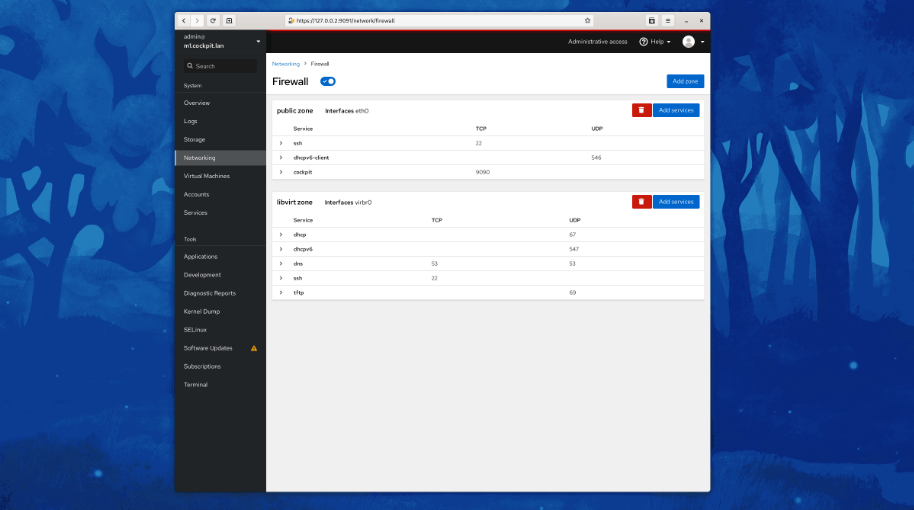
Cockpit serves as a user-friendly web-based graphical interface designed for server management, catering to everyone from beginners to seasoned Linux administrators. By leveraging system APIs and commands, Cockpit allows an entire team of administrators to manage systems in their preferred manner, whether that involves using the command line or various utilities alongside the Cockpit interface. With Cockpit, users can access their servers through a web browser and execute system tasks effortlessly using a mouse. It simplifies operations such as initiating containers, managing storage, configuring networks, and reviewing logs. Essentially, Cockpit acts like a graphical "desktop interface" tailored specifically for individual servers. If you have preferred applications or command-line tools for server management, you can continue utilizing those alongside Cockpit without any disruptions. Since Cockpit operates using the same system tools as the command line, you can seamlessly switch between Cockpit and your other preferred methods. This flexibility ensures that you can efficiently manage your servers while still maintaining your usual workflow.
API Access
Has API
API Access
Has API



Integrations
Altair Knowledge Hub
Ansible
CentOS
Cisco Jabber
Daisee
Debian
Dynamics Telephony
Empirix
Fedora
Fedora CoreOS
Integrations
Altair Knowledge Hub
Ansible
CentOS
Cisco Jabber
Daisee
Debian
Dynamics Telephony
Empirix
Fedora
Fedora CoreOS
Pricing Details
No price information available.
Free Trial
Free Version
Pricing Details
No price information available.
Free Trial
Free Version
Deployment
Web-Based
On-Premises
iPhone App
iPad App
Android App
Windows
Mac
Linux
Chromebook
Deployment
Web-Based
On-Premises
iPhone App
iPad App
Android App
Windows
Mac
Linux
Chromebook
Customer Support
Business Hours
Live Rep (24/7)
Online Support
Customer Support
Business Hours
Live Rep (24/7)
Online Support
Types of Training
Training Docs
Webinars
Live Training (Online)
In Person
Types of Training
Training Docs
Webinars
Live Training (Online)
In Person
Vendor Details
Company Name
Cisco
Founded
1984
Country
United States
Website
www.cisco.com/c/en/us/products/contact-center/finesse/index.html
Vendor Details
Company Name
Cockpit
Website
cockpit-project.org
Product Features
Call Center
Blended Call Center
Call Logging
Call Recording
Call Scripting
Campaign Management
Database
Escalation Management
IVR / Voice Recognition
Inbound Call Center
Manual Dialer
Outbound Call Center
Predictive Dialer
Progressive Dialer
Queue Management
Real-time Chat
Reporting/Analytics
Customer Service
Alerts / Escalation
Appointment Management
Call Center Management
Email Management
Knowledge Base
Live Chat
Performance Metrics
Queue Management
Self Service Portal
Social Media Integration
Surveys & Feedback
Virtual Assistant
Workflow Management
Product Features
Server Management
CPU Monitoring
Credential Management
Database Servers
Email Monitoring
Event Logs
History Tracking
Patch Management
Scheduling
User Activity Monitoring
Virtual Machine Monitoring

